SHADOO: Mobile App Product Design
The goal of this project was end to end product design that balanced user experience and
business requirements.
My Role
UX Strategy, User Research, User Persona, Story Boarding, Wireframing, Usability Testing,
Branding, User Flows, Prototyping, Customer Journey Map
Team and Timeline
Five Designers, 3 Weeks
Tools
Pencil and Paper, Figma, Maze

Background
For this project, our team of five was tasked with the product design of a mobile app, from ideation to working prototype. We started by mind-mapping ideas and decided on a gamified habit and task tracking app. Think Duolingo for your to-do list.
Is This a Viable Idea?
Competitive Market Analysis
We looked at existing productivity and task tracking apps to determine if there was room in the marketplace for our us. The unique combination of features for our idea were gamification (competition and rewards - but not RPG), habit building based in psychology, and personalized customization. After looking at five competitive apps, LifeUp, MinimaList, Habitica, Habitify, and The Fabulous, none had all of our elements. There was a clear place for our idea in the market.
Product Discovery Survey
We conducted a quick survey to understand how people were currently keeping track of their to-do lists, how they were motivated, emotions around tasks and habits, and areas they may struggle with around completion of tasks. The survey revealed three major insights:
-
People want personalization so they can choose what they track
-
Want habit building to be fun and with consistent accountability
-
People were motivated in a variety of ways, one size fits all won't work
Psychology Research
We want people to achieve their goals by using our app. To do that, we would need our product to be deeply rooted in psychology. We researched general app development psychology, gamification psychology, behaviorism, how to build better habits, and the psychology of motivation.
I focused on gamification psychology and discovered that in order to create a system that users want to use on their own volition, they need to feel autonomous, related, and competent and certain game elements can foster each of these feelings. (Source)

UX Strategy
Validated User Research
The survey results, along with our psychology research, informed the areas we needed to dig deeper into with users during user interviews. The data from these user interviews became our guide for what users would be looking for in a task and habit tracking app and the important features we would need to develop.
Different motivation styles Create Guides that motivate the user
Enjoys engaging motivation Gamification elements
A wide variety of tasks/habits per person Need personalization options
Most like using a paper checklist Should mimic checking off a list
Likes visual, sonic, and haptic feedback Celebrate with micro-interactions
All of the data we collected allowed us to truly understand who we designing for. I worked alongside one other teammate to create the user persona while the remaining team members created a task analysis of the current process to pinpoint inefficiencies that could be solved with our app.


People feel a strong sense of accomplishment and happiness when they are able to successfully complete their to-do lists. While people are able to achieve the documentation of their objectives, they still have trouble following through to completion. Many people need help establishing methods to stay motivated and organized in order to reduce abandonment of tasks, habits, and goals.
How might we create a solution to motivate the development of habits and the completion of tasks while simulating the satisfaction of physical lists to assist people in achieving their goals?
Value Innovation
We created a value innovation storyboard to visually show our vision of success for the app. The story starts with a new user hearing about the app from a friend and ends with the user feeling a sense of accomplishment after completing their final task for the day and advancing in the game.


Business Strategy
Before the actual design work began, we wanted to shore up our business strategy. We felt a freemium model would give us the best chance of success.
The basic version of the app will be free to all users, while premium features would be available to users at a subscription cost. Other revenue streams include in-app purchases and possibly in-app ads.
To measure our success, we'll use key metrics like downloads, premium conversion, and social media engagement.
During our user research most participants said they would be willing to refer the app to family and friends. We will count on word of mouth and targeted advertisements to generate initial interest in the app.

Frictionless User Experience
Wireframing and User Testing
In order to satisfy business requirements and work within our time constraints, we decided to build a Minimum Viable Product of the free version of our app. This would focus on Onboarding and the main screens of the app we called the Dashboard. We started with each person quickly sketching out their ideas. I worked on the Dashboard side, specifically on the main screen and the competition element of the game.


We knew we wanted to get feedback via user testing on our ideas before building out a high fidelity prototype, but we felt that low or mid-fi wireframes would not give users a good idea of how the app worked when testing the Dashboard screens. We made the decision to quickly mock up high-fidelity images in Canva and then imported them into Figma so we could link the screens together and then conduct user testing in Maze. The onboarding team used a traditional wireframe.
When testing the Dashboard screens, there was a 20.8% misclick rate for the task "Complete one task for today". Since this is on the high side, it led us to develop a tutorial that could be explored by users during onboarding.
.png)
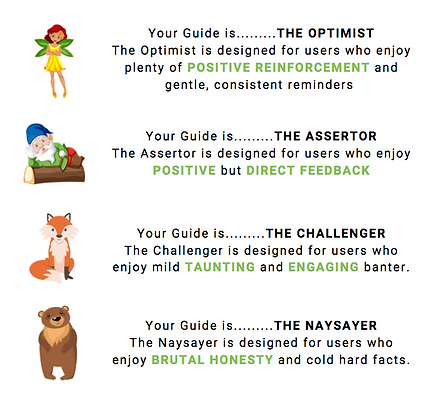
One major part of the Onboarding screens is the Motivations Quiz. Based on users' responses to questions about their motivation style, the app will pair you with an animated character Guide that motivates you throughout your use of the app. There was a 25% misclick rate on the initial screen for the quiz as users were trying to navigate around it. This indicated to us that users didn't fully understand what the purpose of the Guide Quiz was and that we would need to revise the language around how we introduced the quiz and why it would be important for the users.

The last part of our user testing was for a Motivations quiz. During our initial user research, we learned that people were motivated in different ways and providing different Guides for each unique style would be important. We created a multiple choice quiz to determine which Guide would be best suited to each user based on their responses. We had a 100% success rate where all users felt they were accurately placed with the Guide that best matched their motivation style.
User Flow
Incorporating insights from our using testing, we created a user flow to chart the ideal path our users would take. It includes paths for new and returning users, with the goal of completing a task. This would serve as our guide in making sure the screens in our prototype flowed in a logical manner.

Branding and Prototyping
The name of our app, Shadoo, comes from "Should Do". Branding discussions stemmed from providing a "path" forward in improving the daily lives of our users while keeping the fun tone of the name. We incorporated a path in the shape of an "S" for Shadoo for the app icon and a woodland theme felt appropriate along with woodland characters as Guides. We wanted the app to feel motivational, playful, helpful, and calming but also mature, so we chose a color palette that felt more refined to emphasize this was an app for adults.
We created 75 screens for the entire onboarding process, guide quiz, tutorial, and main app dashboard screens. Our main goal for the V1 prototype was to show the onboarding and main dashboard screens, how a user would flow through the app, and the micro-interactions that give the app personality. Due to the time constraints, there was some functionality we weren't able to build out. For example, if you add a task or habit, it won't show up on your to-do list.


Future State Customer Journey Map
We created a future state customer journey to understand and visualize the ideal experience for the user. This will help us align business execution with the user to ensure the best possible experience as we continue to build out and refine the app.
.png)
Outcomes
Next Steps for Future Iterations
Due to time restrictions, we weren't able to build and test all of the ideas we had for Shadoo. User Testing the V1 prototype is the first priority and then continuing to build out features and functionality. The following features are some of the potential ideas for future iterations we would like to explore.
• Build out competition mode
• Explore premium features (cost, change Guide clothes)
• Invite my friends to compete
• On screen timer attached to some tasks / habits
• Horizontal month view (bullet journaling to show progress)
• Difference between work and personal tasks
• Delete or trash can option
• Build out what notifications look like
• iPhone system for sharing
• Build up library of pre-planned habits for quick add
• Widget integration
Lessons Learned
I learned so much working on a project like this where it was necessary to find a balance between user and business requirements, as well as finding alignment between five designers with differing design opinions. I learned that you can use the constraints you're given to create a guiding structure and by using research backed decisions and prioritizing the user under the dome of your constraints, you can successfully find that balance.